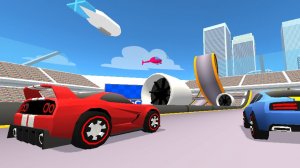
DashCraft Racing Arcade Game stands out with its creative track builder and ghost racing system. The ability to design and share custom courses adds tremendous replay value. Regular updates keep the experience fresh, and the free-roam mode is perfect for practicing stunts. A must-try for arcade racing fans.
Description
Game Introduction
DashCraft Racing Arcade Game is an online browser-based racing game that blends high-speed driving with creative track building. Players can race on tracks designed by the global community, offering a constantly changing experience. The core objective is to set faster lap times by competing against ghost versions of other racers, which represent their best runs. This unique blend of racing and creativity sets it apart, allowing players to both build and race. Developed by Ctrl4ltDel, the game receives regular updates that introduce new features and keep the gameplay fresh.
How to Play
Players control their car using keyboard keys: accelerate with the up arrow or W key, steer left with A or left arrow, and steer right with D or right arrow. Braking is done with S, down arrow, or space bar. If a mistake is made, pressing R restarts from the last checkpoint, while Backspace restarts from the beginning of the track. In build mode, on-screen controls guide players to place track pieces, boosters, ramps, and checkpoints. The goal is to race against ghost cars and climb the leaderboard by achieving faster times.
Game Features
Features include a custom track builder that allows players to design unique courses using various pieces and props. Multiplayer ghost racing enables competition against others without direct interference. A diverse car selection offers options to suit different driving styles. Free-roam mode provides a space to practice jumps and stunts without time limits. Regular updates introduce new content and improvements, keeping the game engaging. The community-built tracks ensure no two races feel the same, offering a constantly evolving challenge.
Tips for Success
Practice regularly to learn the layout of each track and improve your lap times. Use free-roam mode to master stunts and loops without the pressure of a race. Pay attention to ghost racers to see the best lines and braking points. Experiment with different cars to find one that matches your driving style. When building tracks, focus on creating smooth, flowing courses that are fun to race. Finally, keep an eye on updates for new features and track pieces that can give you an edge.
Compatibility
✅ This game supports:
- Desktop browsers (Chrome, Edge, Safari)
- Mobile browsers (Chrome on Android, Safari on iOS)
❌ Does NOT support: - Internet Explorer - Very old browser versions
👉 Try refreshing or updating your browser
Faq
Is DashCraft Racing Arcade Game free to play?
Yes, DashCraft Racing Arcade Game is free to play in your browser. There are no hidden fees or subscription costs. You can start racing and building tracks immediately without any payment.
Do I need to download anything to play DashCraft Racing?
No download is required. DashCraft Racing Arcade Game runs directly in your web browser. Simply visit the game website and start playing instantly. This makes it easy to play on any device with an internet connection.
Can I play DashCraft Racing on mobile devices?
DashCraft Racing Arcade Game is designed for desktop browsers with keyboard controls. While it may load on some mobile devices, the controls are optimized for keyboard input, so a computer is recommended for the best experience.
How often does DashCraft Racing receive updates?
The developer, Ctrl4ltDel, releases regular updates that introduce new features, track pieces, and improvements. The exact schedule is not specified, but updates are frequent enough to keep the gameplay fresh and engaging.
Can I share my custom tracks with other players?
Yes, the custom track builder allows you to design courses and share them with the global community. Other players can then race on your tracks, and you can race on theirs. This creates a constantly evolving library of tracks.
What happens if I crash my car during a race?
If you make a mistake, you can press R to restart from the last checkpoint you passed. Alternatively, pressing Backspace will restart you from the beginning of the track. This helps you practice specific sections without losing progress.
Player Comments
💬
Sign in to comment
You must be logged in before posting a review or rating.


Player Comments
Sign in to comment
You must be logged in before posting a review or rating.
No account? Create one
No comments yet. Be the first to comment!