Store Manager 3D Retail Simulator offers a clean and engaging business simulation experience. The simple controls make it accessible, while the progressive upgrades keep you motivated. Watching your small shop grow into a busy retail center is genuinely satisfying. The game balances strategy and casual play well, making it ideal for short sessions or longer play.
Description
Game Introduction
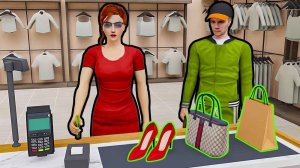
Store Manager 3D Retail Simulator puts you in charge of a clothing store. You begin with a modest space and basic racks. Your main task is to attract customers by arranging appealing displays and keeping the store clean. As you earn profits, you can upgrade the layout, add new brands, and unlock licenses. The game rewards careful planning and efficient management. Each improvement makes your store more attractive and profitable. With a straightforward progression system, you can build a retail business step by step. This game is designed for players who enjoy hands-on business simulation without complicated mechanics. You can see your store grow from a small shop to a busy retail center. The satisfaction comes from making good decisions and watching your business thrive. Whether you have a few minutes or an hour, you can make progress and enjoy the experience.
How to Play
Players typically move their character around the store using keyboard controls. They can interact with objects like racks and stands to set up merchandise. The goal is to stock clothing, welcome customers, and keep the store organized. Each sale earns profits that can be reinvested. Players can upgrade their shop layout and unlock new clothing brands as they expand. Simple on-screen controls are available for mobile devices. The game guides players through each step with clear objectives and straightforward mechanics.
Game Features
Manage your own clothing store. Set up stands and racks to display merchandise. Stock clothes and attract customers. Earn profits and reinvest them. Upgrade your shop layout and equipment. Unlock new clothing brands and licenses. Expand your store to become a retail tycoon. Simple controls work on keyboard and mobile. Progressive difficulty keeps the game engaging. Visual upgrades show your store improving over time.
Tips for Success
Focus on keeping your store clean and well-organized to attract more customers. Prioritize upgrading your layout and equipment early to boost profits. Reinvest earnings consistently to unlock new brands and expand your space. Pay attention to customer flow and adjust your displays to maximize sales. Plan your upgrades strategically to maintain steady growth without overspending.
Compatibility
Play on Any Device | Chrome / Safari / Edge Recommended
Faq
Is Store Manager 3D Retail Simulator available on mobile devices?
Yes, the game includes simple on-screen controls designed for mobile devices, making it easy to play on smartphones and tablets while maintaining the full store management experience.
Can I play Store Manager 3D Retail Simulator offline?
The game is primarily a single-player experience, and many similar simulators allow offline play. However, check the specific platform requirements to confirm offline availability for your device.
What types of clothing brands can I unlock in the game?
As you progress, you can unlock various new clothing brands and licenses. The exact brands are not specified, but they add variety and appeal to your store, helping attract different customer types.
How long does it take to complete Store Manager 3D Retail Simulator?
The game has a progressive difficulty system with no fixed endpoint. You can continue expanding your store indefinitely. Playtime depends on your goals, from a few minutes to long sessions.
Are there any in-app purchases in Store Manager 3D Retail Simulator?
The game description does not mention in-app purchases. Many similar simulators offer optional purchases for faster progression, but this may vary by version. Check the store listing for details.
Does the game include customer feedback or reviews?
Customer satisfaction is implied through sales and store appeal. While specific feedback systems are not detailed, the game likely uses visual cues like customer flow to indicate how well your store is performing.
Player Comments
💬
Sign in to comment
You must be logged in before posting a review or rating.










Player Comments
Sign in to comment
You must be logged in before posting a review or rating.
No account? Create one
No comments yet. Be the first to comment!