Fantasy Dragon Creator offers a peaceful and imaginative experience where players design friendly dragons. The extensive customization options, including outfits, colors, and accessories, allow for unique creations. The lack of timers or scores makes it perfect for stress-free play. The snapshot feature is a nice touch for sharing designs. Ideal for families and fantasy fans.
Description
Game Introduction
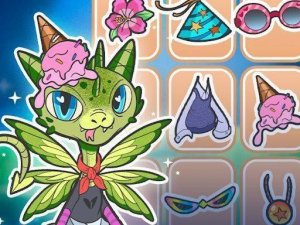
Fantasy Dragon Creator is a digital craft activity that invites players into a creative space where imagination takes flight. The game focuses on designing and personalizing friendly dragons. Players begin with a basic dragon form and then explore a wide range of customization options to create a unique creature that reflects their personal style. The experience is relaxed and open-ended, with no scores, timers, or competitive elements. It is designed for self-expression and enjoyment, making it a suitable activity for families and fantasy enthusiasts. The core objective is to have fun while bringing a fantastical creature to life through color, clothing, and accessories.
How to Play
Playing Fantasy Dragon Creator is straightforward. Players first select a base dragon shape. Then, they navigate through various menus to choose different wing styles, such as feathered or leathery designs. Next, they can pick from a collection of outfits and costumes. Additional accessories like hats, glasses, bow ties, or collars can be added. A color palette allows players to paint their dragon in any shade they prefer. Stickers can be placed on the dragon for extra decoration. Once the design is complete, an in-game camera feature lets players take a snapshot of their creation. These images can be saved to a device or shared with others.
Game Features
Fantasy Dragon Creator offers extensive customization for dragon body parts. It includes a large library of outfits, costumes, and accessories. A vibrant color palette and a variety of stickers are available for personalization. The game also features a snapshot tool that allows players to save and share their completed dragon designs. The experience is designed to be relaxing and creative, with no time limits or scoring systems.
Tips for Success
Take your time exploring all the customization menus to discover the full range of options. Experiment with different color combinations and accessory pairings to create unique looks. Use the snapshot feature to save your favorite designs. Sharing your creations with friends and family can inspire new ideas. Most importantly, focus on enjoying the creative process rather than aiming for perfection.
Compatibility
Play on Any Device | Chrome / Safari / Edge Recommended
Faq
Can I save my dragon designs in Fantasy Dragon Creator?
Yes, the game includes a snapshot tool that allows you to take a picture of your finished dragon. You can save these images to your device or share them with others. This makes it easy to keep a collection of your favorite creations.
Is Fantasy Dragon Creator suitable for young children?
Yes, the game is designed for families and has no violent or inappropriate content. The interface is simple and intuitive, making it accessible for children. There are no timers or scores, so kids can play at their own pace without pressure.
Do I need an internet connection to play Fantasy Dragon Creator?
The game may require an internet connection for initial download or for sharing designs online. However, the core customization and design features likely work offline once the game is installed. Check the app store description for specific details.
Can I change my dragon's design after I finish it?
Typically, games of this type allow you to revisit and modify your creations. You can likely load a saved dragon and change its colors, outfits, or accessories. This encourages experimentation and creativity without losing previous work.
Are there any in-app purchases in Fantasy Dragon Creator?
The game may offer optional in-app purchases for additional outfits, accessories, or color packs. However, the base game provides a generous selection of free items to create many unique dragons. Always check the app store listing for specific pricing details.
Can I share my dragon designs with friends who don't have the game?
Yes, the snapshot feature allows you to save images of your dragon to your device. You can then share these images through messaging apps, social media, or email. This way, friends and family can see your creations even if they don't have the game installed.
Player Comments
💬
Sign in to comment
You must be logged in before posting a review or rating.




Player Comments
Sign in to comment
You must be logged in before posting a review or rating.
No account? Create one
No comments yet. Be the first to comment!