City Navigator 3D Quest offers a refreshing take on urban exploration by emphasizing strategy over action. The slow-motion mode is brilliantly implemented, giving players the chance to think through complex maneuvers. Driving through the vibrant city is satisfying, and the item-based puzzles add depth without becoming frustrating. The online component is subtle but welcome, letting you see how others tackle the same challenges. It is a polished, family-friendly experience that respects the player's time and intelligence.
Description
City Layout & Navigation
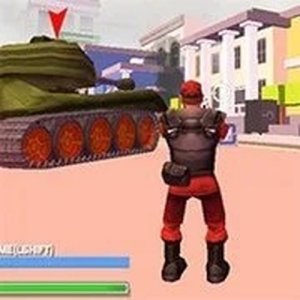
Players guide a character through a detailed 3D urban environment filled with streets, buildings, and open spaces. The city is designed to encourage exploration, with multiple routes and hidden areas to discover. Movement is controlled with standard keyboard keys, allowing for smooth navigation around obstacles and through traffic. The layout changes dynamically, requiring players to adapt their path based on mission objectives. Driving vehicles becomes essential for covering larger distances quickly, and each vehicle handles differently, adding variety to travel.
Strategic Slow-Motion Mode
A key feature is the slow-motion function, which slows down time during critical moments. This gives players extra seconds to assess their surroundings and decide the best course of action. Whether avoiding obstacles, collecting items, or planning a route, this tool reduces pressure and rewards thoughtful play. The slow-motion effect is visually clear and easy to activate, making it accessible for younger players while still offering depth for experienced gamers.
Item-Based Problem Solving
Throughout the city, players find various items that can be used to overcome challenges. These objects might help unlock new areas, speed up progress, or provide temporary advantages. The game encourages experimentation with different items to see which combinations work best for each situation. Using items at the right moment is crucial for completing missions efficiently. This system promotes creative thinking and adds a layer of strategy beyond simple navigation.
Online Social Interaction
An online component allows players to share the city with others. While the focus remains on individual exploration, the presence of other players adds a social dimension. Players can observe how others navigate the environment, which can inspire new strategies. The online mode is designed to be family-friendly, with no direct competitive pressure. It simply enhances the sense of being part of a living, active city.
Visual Style & Accessibility
The game features bright, colorful graphics that make the city feel inviting and clear. The interface is straightforward, with on-screen prompts that help new players learn controls quickly. A pause function is available at any time, allowing players to take breaks or review their strategy without penalty. The overall design prioritizes a positive, stress-free experience suitable for players of all ages and skill levels.
Compatibility
💻 Desktop | 📱 Mobile | 📟 Tablet
– All supported · Best with Chrome or Safari
Faq
Is City Navigator 3D Quest suitable for young children?
Yes, the game is designed for all ages. There is no violent content, and the controls are simple to learn. The slow-motion feature helps younger players plan their moves without feeling rushed. Parental guidance may still be helpful for very young children to understand mission objectives.
Can I play City Navigator 3D Quest offline?
The game is primarily an online experience, as it includes social features with other players. However, some basic navigation and practice modes may be accessible offline. Check the game's settings or official page for specific offline capabilities.
What types of vehicles are available in the game?
The game includes several vehicle types, such as cars and possibly scooters, each with different speeds and handling. Vehicles are found throughout the city and can be used to travel faster between objectives. The exact variety may depend on the game version or updates.
How do I unlock new areas in the city?
New areas become accessible as you complete missions and collect specific items. Some zones may require using a particular vehicle or item to enter. The game encourages thorough exploration to find these unlock requirements. Progress is saved automatically.
Does the game have a time limit for missions?
Most missions do not have strict time limits, allowing players to proceed at their own pace. The slow-motion feature can be used freely to extend decision-making time. Some optional challenges may have timers for extra rewards, but the main experience is relaxed.
Can I customize my character's appearance?
Character customization options may be available, such as changing outfits or accessories. These are typically unlocked by completing missions or finding special items in the city. Customization is cosmetic only and does not affect gameplay mechanics.
Player Comments
💬
Sign in to comment
You must be logged in before posting a review or rating.




Player Comments
Sign in to comment
You must be logged in before posting a review or rating.
No account? Create one
No comments yet. Be the first to comment!