Stack & Clear Block Puzzle delivers a polished take on the timeless formula. The controls are responsive on both desktop and mobile, and the gradual speed increase provides a satisfying challenge without feeling unfair. The clean visual design keeps the focus on the puzzle, while the preview system helps players plan ahead. It is an excellent choice for quick breaks or longer play sessions.
Description
Core Gameplay Loop
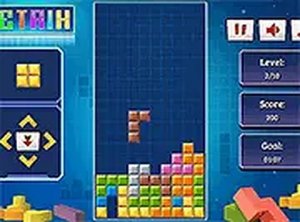
Stack & Clear Block Puzzle presents players with a vertical playing field where various geometric shapes descend from the top. The objective is to rotate and slide each piece into position so that it forms a solid horizontal line across the board. Once a line is complete, it vanishes, awarding points and freeing up space for additional shapes. The game continues until the accumulated pieces reach the top of the screen, ending the session. This straightforward mechanic creates a satisfying rhythm of placement, clearance, and planning.
Controls and Accessibility
The game is designed for immediate play across devices. On desktop computers, players use keyboard keys to move pieces left or right, rotate them, and speed up their descent. For mobile users, touch gestures serve the same functions, making the game fully functional on smartphones and tablets. A preview window shows the next piece in line, allowing players to anticipate and strategize their moves. The interface remains clean and uncluttered, focusing attention on the puzzle itself.
Progression and Difficulty Curve
As players successfully clear lines, the speed at which new pieces fall gradually increases. This escalation introduces a growing sense of urgency without becoming overwhelming. The scoring system rewards clearing multiple lines at once, encouraging players to set up combinations rather than simply placing pieces haphazardly. Over time, players develop faster reaction times and better spatial awareness, which are key to achieving higher scores.
Visual and Technical Design
Built with HTML5 technology, Stack & Clear Block Puzzle runs smoothly in any modern web browser without requiring additional software or downloads. The visuals are clean and functional, with distinct colors for different shapes to aid quick identification. The game adapts to various screen sizes, providing a consistent experience whether played on a large monitor or a small phone display. Full-screen mode is available for those who prefer an immersive view.
Strategic Considerations
Success in this game relies on more than quick reflexes. Keeping the stack of pieces as level as possible prevents awkward gaps that are difficult to fill. Watching the upcoming piece preview allows players to plan placements several moves ahead. Creating opportunities to clear multiple lines at once yields significantly higher scores, so experienced players often leave narrow openings for long straight pieces. The combination of short-term placement decisions and long-term planning gives the game lasting depth.
Compatibility
• OS: Windows 10+, macOS 11+, iOS 14+, Android 10+
Yes, Stack & Clear Block Puzzle is completely free to play. There are no hidden fees or in-app purchases required. Simply open the game in your browser and start playing immediately.
Can I play Stack & Clear Block Puzzle on my phone?
Yes, the game is optimized for mobile browsers. You can control the pieces using touch gestures, making it easy to play on smartphones and tablets without any loss of functionality.
What happens when I clear multiple rows at once?
Clearing multiple rows simultaneously awards bonus points. For example, clearing four rows at once (a 'Tetris') gives a significantly higher score than clearing them one at a time. This encourages strategic placement.
Does the game save my high score?
High scores are typically saved in your browser's local storage during the current session. However, scores may reset if you clear your browser data or play in a different browser or device.
Is there a time limit for each move?
There is no strict time limit for each individual move. However, pieces fall at a constant rate that increases as you progress. You can speed up a piece's descent, but you cannot pause the falling action.
What should I do if the game lags or freezes?
First, try refreshing the browser page. If the issue persists, ensure your browser is updated to the latest version. The game runs on HTML5, so it works best on modern browsers like Chrome, Firefox, or Safari.
Player Comments
💬
Sign in to comment
You must be logged in before posting a review or rating.







Player Comments
Sign in to comment
You must be logged in before posting a review or rating.
No account? Create one
No comments yet. Be the first to comment!