Seasonal Blossom Outfit Creator stands out for its gentle approach to fashion gaming. The wide selection of floral tops, dresses, and accessories encourages endless experimentation without any stress. Controls are intuitive, making it easy for young children to join in, while the pastel art style and garden backgrounds create a soothing atmosphere. The lack of timers or scores means every session feels like a personal creative project. It is an excellent choice for parents seeking a safe, ad-free activity that sparks imagination and color sense in their kids.
Description
Core Styling Mechanics
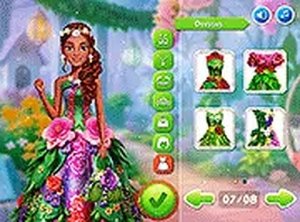
Players select from a rotating collection of tops, dresses, shoes, and decorative items. Each piece carries floral motifs and soft color palettes that evoke spring gardens. The interface presents categories on screen, and a single click or tap places the chosen item onto the character. There is no right or wrong combination, which encourages playful experimentation. Users can layer accessories like hats or necklaces to add personality to each outfit. The system allows unlimited changes, so players can refine their looks until they feel satisfied. This straightforward approach makes the game accessible to young children while still offering enough variety for older players who enjoy fashion coordination.
Visual Design and Theme
The art style uses bright, pastel tones with gentle outlines, creating a warm and inviting atmosphere. Characters have friendly expressions and simple poses that keep the focus on the clothing. Backgrounds depict sunny parks and garden settings, reinforcing the seasonal theme. The flower patterns on garments range from daisies to tulips, giving each piece a distinct identity. Animations are minimal, which helps the game run smoothly on various devices. The overall presentation feels like a digital coloring book for fashion, where the player controls the palette and composition.
Controls and Accessibility
The game supports both mouse and touch inputs, making it suitable for desktop computers, tablets, and smartphones. Buttons are large and clearly labeled, reducing confusion for first-time users. There are no hidden menus or complex gestures required. Players can undo selections with a simple tap, allowing for quick corrections. The lack of timers or scoring means that even hesitant users can take as long as they need. This inclusive design ensures that people with different skill levels or ages can participate without frustration.
Creative Expression Without Pressure
Unlike many dress-up games that reward speed or accuracy, this title prioritizes personal satisfaction. Players are free to ignore trends and instead focus on colors and patterns that appeal to them. The game does not judge combinations, which reduces anxiety for those who feel insecure about their fashion choices. This makes it an excellent tool for teaching color theory or simply relaxing after a busy day. The open-ended nature also encourages repeat play, as each session can produce a completely different look based on the player's mood.
Family-Friendly Environment
All content is appropriate for children, with no suggestive clothing or mature themes. The characters are designed to be relatable without being overly stylized. Parents can let young children play independently, knowing that the game contains no advertisements or external links. The simple vocabulary and clear instructions mean that even non-readers can navigate the menus by recognizing icons. This makes the game a reliable choice for family entertainment during quiet afternoons or travel.
Compatibility
✅ Works on PC & Mobile | Recommended: Chrome / Safari / Edge
Faq
Can I save my created outfits in Seasonal Blossom Outfit Creator?
The game focuses on real-time styling rather than saving outfits. Players can enjoy creating looks during each session, but there is no built-in gallery or export feature. If you want to keep a favorite combination, you can take a screenshot using your device's capture function.
Does this game require an internet connection to play?
Seasonal Blossom Outfit Creator is designed to work offline after the initial load. This makes it convenient for playing during car rides or in areas with limited connectivity. Check the specific platform version for any download requirements before starting.
Are there any in-app purchases or advertisements in this game?
The game is free from advertisements and does not include in-app purchases. All clothing items and accessories are available from the start, so players can enjoy the full experience without spending money or encountering interruptions.
How many characters can I dress up in this game?
The game typically features one main character for styling, allowing players to focus on creating multiple outfits for the same figure. Some versions may include additional characters, but the core experience revolves around dressing a single friendly character.
Is Seasonal Blossom Outfit Creator suitable for toddlers?
Yes, the simple tap or click controls and lack of timers make it appropriate for toddlers. The bright colors and friendly character design appeal to young children. However, adult supervision is recommended for very young players to help them navigate the menus.
Can I play this game on a tablet or smartphone?
Yes, the game is optimized for touch screens and works well on tablets and smartphones. The interface scales to fit different screen sizes, and buttons remain easy to press even on smaller displays. This makes it a good choice for mobile entertainment.
Player Comments
💬
Sign in to comment
You must be logged in before posting a review or rating.





Player Comments
Sign in to comment
You must be logged in before posting a review or rating.
No account? Create one
No comments yet. Be the first to comment!