Feline Fashion Studio offers a stress-free creative outlet for anyone who enjoys putting together outfits. The interface is clean and responsive, making it easy to browse clothing and accessories. The makeup options add a nice extra layer of customization. Since there are no timers or scores, players can explore at their own pace. It is a solid choice for a relaxing break or a longer creative session.
Description
Outfit Creation Basics
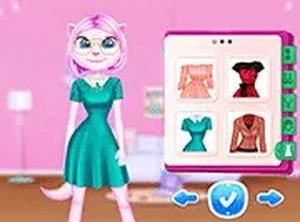
In this dress up game, players work with a character named Angela to build complete outfits. The process starts by selecting a top, bottom, or dress from a collection of clothing pieces. Each item can be tried on instantly with a simple click or tap, making it easy to see how different pieces work together. The game focuses on personal expression rather than following any strict rules or achieving high scores.
Accessory Selection
After choosing the main clothing, players can add accessories to refine the look. Hats, bags, and jewelry pieces are available to complement the outfit. These items can be mixed and matched freely, allowing for many combinations. The interface responds quickly, so changes appear right away without any delays.
Makeup Customization
For those who want to go further, makeup options provide additional ways to personalize Angela's appearance. Eyeshadow, lipstick, and blush can be applied in different colors and styles. This layer of customization adds depth to the creative process without making the game complicated. Players can adjust or remove makeup at any time.
Platform and Accessibility
The game runs directly in a web browser on both desktop computers and mobile devices. There is no need to download anything or create an account. Controls are designed for mouse or touch screen input, and a full screen mode is available for a more focused experience. The game loads quickly and works well on different screen sizes.
Relaxed Play Style
There are no timers, scores, or competitive elements in this game. Players can take as much time as they like to experiment with different combinations. This makes it suitable for short breaks or longer sessions where the goal is simply to enjoy the creative process. The atmosphere remains calm throughout, with no pressure to perform or complete tasks.
Compatibility
✅ This game supports:
- Desktop browsers (Chrome, Edge, Safari)
- Mobile browsers (Chrome on Android, Safari on iOS)
❌ Does NOT support: - Internet Explorer - Very old browser versions
👉 Try refreshing or updating your browser
Faq
Does Feline Fashion Studio require an internet connection to play?
Yes, because it runs in a web browser, you need an active internet connection to load the game. Once loaded, most interactions happen locally, but the game itself is not available offline.
Can I save my favorite outfits in Feline Fashion Studio?
The game does not include a built-in save feature for outfits. Each session starts fresh, so you can create new combinations each time you play. This encourages trying different styles without worrying about saving progress.
Is Feline Fashion Studio suitable for young children?
Yes, the game is designed for players of all ages. The controls are simple, the content is family-friendly, and there are no violent or inappropriate themes. Young children can play with minimal assistance.
Are there any in-game purchases or ads in Feline Fashion Studio?
Based on the game description, there are no in-game purchases or subscription fees. The game is free to play in your browser. Ads may appear depending on the hosting site, but the game itself does not require any payments.
How many clothing items are available in Feline Fashion Studio?
The game includes a variety of tops, bottoms, dresses, accessories, and makeup options. The exact number is not specified, but there are enough items to create many different looks. Players can mix and match freely.
Can I play Feline Fashion Studio on a tablet or smartphone?
Yes, the game is optimized for mobile browsers and works on tablets and smartphones. Touch screen controls are supported, so you can tap to select items and swipe to browse options just like on a desktop.
Player Comments
💬
Sign in to comment
You must be logged in before posting a review or rating.










Player Comments
Sign in to comment
You must be logged in before posting a review or rating.
No account? Create one
No comments yet. Be the first to comment!