Grid Path Planner succeeds by keeping its core rule simple while introducing clever twists through portals and jumps. The gradual difficulty curve ensures that players never feel lost, and the lack of time pressure makes it ideal for relaxed problem-solving. Visual feedback is clear, and controls are responsive on any device. It is a solid choice for anyone who enjoys spatial reasoning puzzles.
Description
Core Puzzle Concept
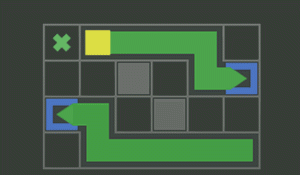
In Grid Path Planner, the objective is straightforward: draw a single continuous line that passes through every empty cell on a grid. The line must start at a designated point and end at a marked target cell. Each cell can be visited only once, making route planning essential. The challenge grows as players encounter special elements that alter the path's behavior.
Special Elements and Complexity
Two key features introduce additional layers of difficulty. Portals instantly transport the line from one location to a matching partner elsewhere on the grid. Jumps allow the line to skip over a single cell, which can help navigate around obstacles or reach isolated areas. These elements must be used strategically to complete each puzzle.
Visual Feedback and Controls
The interface provides clear visual cues. As the line moves, filled cells change color, giving immediate confirmation of progress. Controls are optimized for both mouse clicks on desktop and touch taps on mobile devices. If a mistake occurs, players can restart the current level without penalty, encouraging experimentation.
Level Progression and Variety
Each level presents a unique grid layout, with complexity increasing gradually. Early puzzles are small and straightforward, while later ones incorporate multiple portals and jumps in tight spaces. The game does not impose time limits, allowing players to think at their own pace. This design makes it suitable for short breaks or extended play sessions.
Family-Friendly Design
Grid Path Planner features clean, simple visuals with no inappropriate content. The focus is entirely on mental challenge and pattern recognition. The absence of timers or pressure creates a relaxed atmosphere where players can enjoy solving puzzles without stress. This approach makes the game accessible to a wide age range.
❌ Not supported: Internet Explorer, older browser versions
Faq
Can I play Grid Path Planner on my phone?
Yes, the game is designed with responsive controls that work well on both desktop and mobile browsers. Touch input is supported for drawing paths on tablets and smartphones.
Is there a hint system if I get stuck?
The game does not include built-in hints. However, players can restart any level as many times as needed to try different strategies. Observing how portals and jumps interact often reveals the solution.
How many levels are available in Grid Path Planner?
The exact number of levels may vary by version, but the game typically includes a substantial set of puzzles that increase in difficulty. New levels are sometimes added through updates.
Does the game require an internet connection to play?
Most versions of Grid Path Planner can be played offline after the initial load. However, some browser-based implementations may need an internet connection to access the game page.
Are there any in-app purchases or ads?
The game is free to play with no in-app purchases. Some versions may display non-intrusive ads, but these do not affect gameplay or require payment to remove.
What age group is Grid Path Planner suitable for?
The game is family-friendly and appropriate for all ages. Younger children may need help with later puzzles, but the core mechanics are simple enough for early elementary students to understand.
Player Comments
💬
Sign in to comment
You must be logged in before posting a review or rating.









Player Comments
Sign in to comment
You must be logged in before posting a review or rating.
No account? Create one
No comments yet. Be the first to comment!